
Will the DVD Logo Ever Hit the Corner?
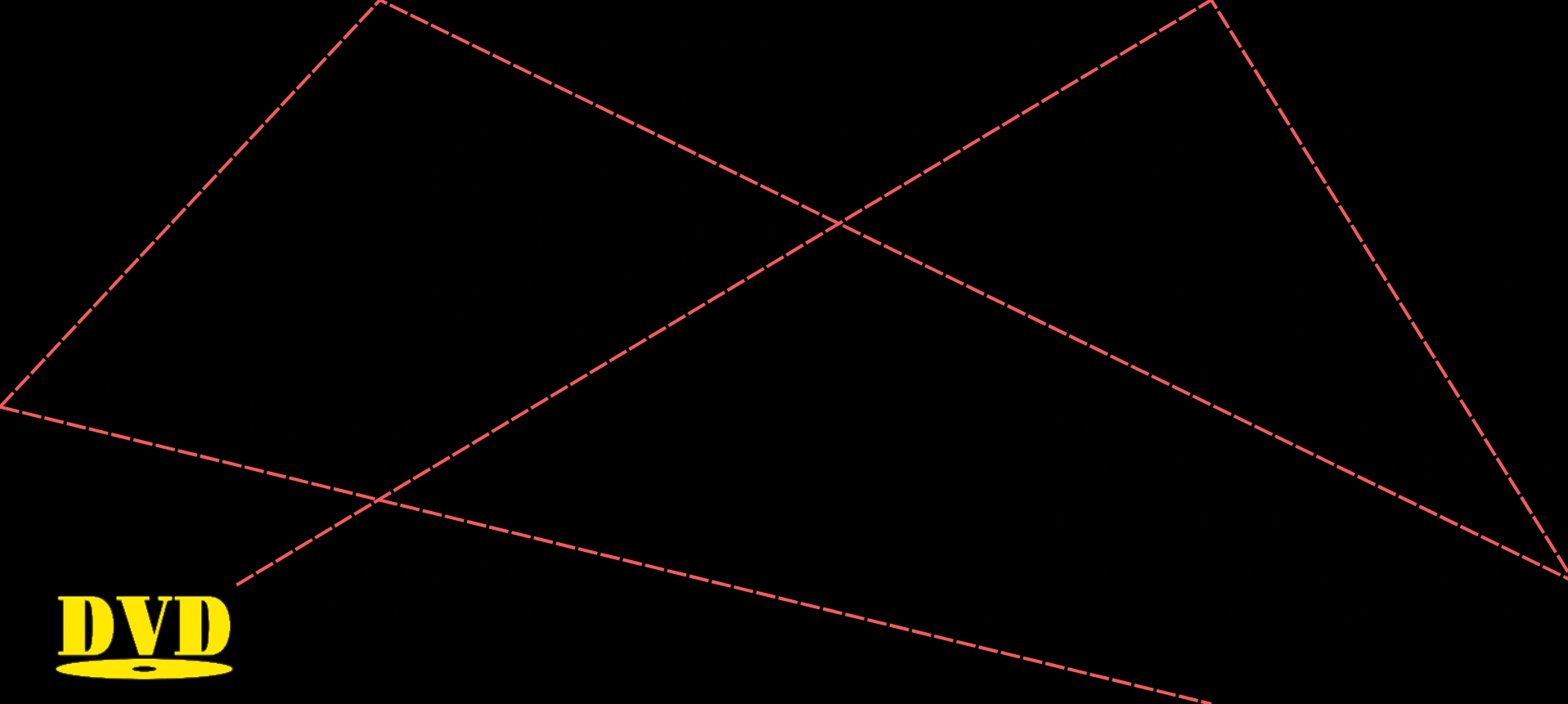
Everyone who has watched a DVD screensaver has asked the same thing: is it actually going to hit the corner, or am I wasting my life?
The question has an exact answer. Not a probability, not an average — an answer you can work out in advance from four things: how big the screen is, how big the logo is, how fast it moves, and where it started. Here is how, in three steps.
Step One: The Screen Is Smaller Than It Looks
Start with the thing that is actually bouncing. The logo is a rectangle, not a point, so what travels is its top-left corner — and that corner can never reach the right edge of the screen, because the rest of the logo is in the way. Its room to move is the screen minus the logo.
Now bring in the speed. The logo shifts a fixed number of pixels every frame — four is typical — so it can only ever land on every 4th pixel of that range. The pixels in between are not merely rare. They are unreachable.
Delete them and the picture changes completely. On the left below, every crossing is a pixel and only the cyan ones can hold the logo. On the right, the cyan ones on their own.
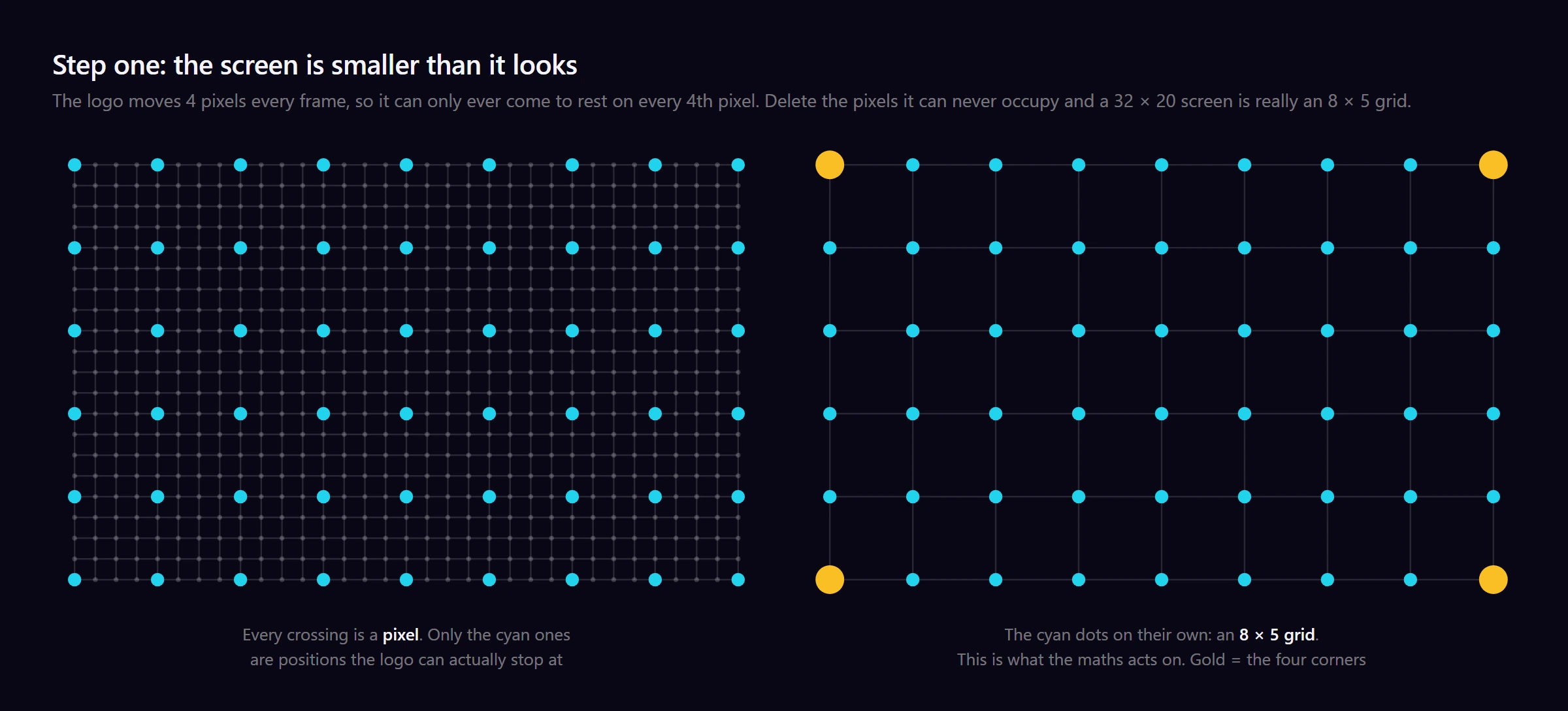
What is left is the grid the problem really lives on, and its size is just:
- X = (screen width − logo width) ÷ speed
- Y = (screen height − logo height) ÷ speed
So a 3840 × 2160 screen carrying a 176 × 80 logo at 4 pixels a frame is not a four-million-pixel problem. It is a 916 × 520 one.
That is the whole reduction. Any screen, any logo, any speed: a point stepping diagonally around an X by Y grid, one square at a time. Those two numbers decide everything that follows.
One assumption, stated up front. Everything here takes the logo to travel at a true diagonal — one pixel sideways for every pixel down. That is how the original DVD player screensaver behaved, and how the clip analysed below behaves. Launch it at some other angle and the lattice dissolves, taking every clean result on this page with it.
Step Two: One Number Decides Whether It Ever Happens
Now the part that catches people out. Whether a corner is ever reached has nothing to do with how long you wait. It is settled before the first frame.
Here is why. Forget corners for a moment and just watch the edges. Stepping diagonally on an X by Y grid, the logo touches a left or right edge every X frames, like clockwork, and a top or bottom edge every Y frames. Bouncing never disturbs those rhythms, because the bounce is the rhythm — it is what touching an edge means.
A corner is nothing more than both alarms going off on the same frame.
So the question stops being about geometry and becomes a question about two repeating alarms: given where each one sits in its cycle, will they ever ring together? Two alarms can only ever coincide if the gap between their first rings is a multiple of whatever their periods have in common. What X and Y have in common is their greatest common divisor.
That is the entire test. Take gcd(X, Y). If the logo set off down-and-right, it reaches a corner only when that divisor divides the difference of its starting coordinates; if it set off up-and-right, only when it divides their sum. Otherwise the two alarms are permanently out of step, and running for longer cannot fix a rhythm.
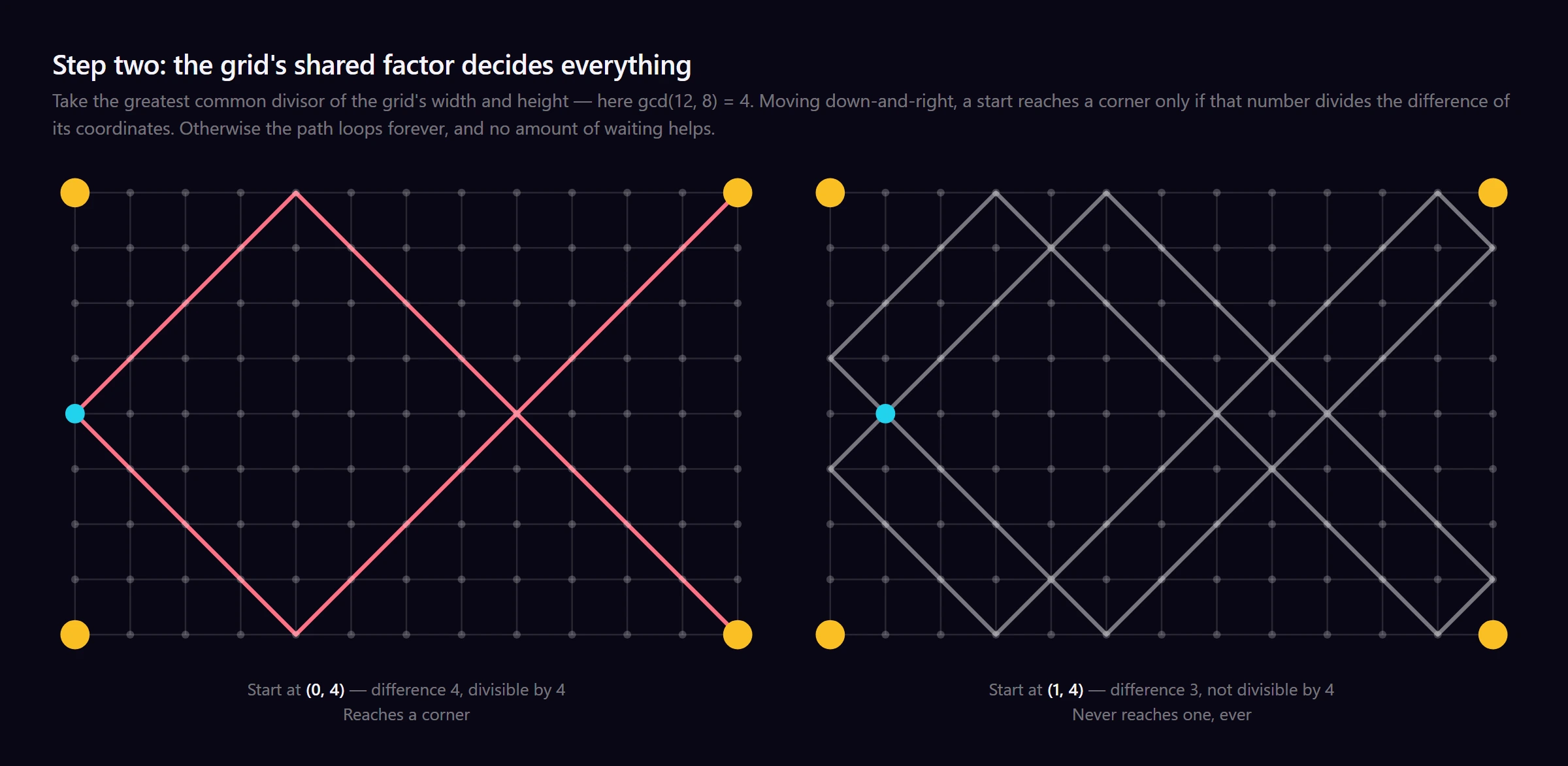
Two starting squares, one apart, on the same 12 × 8 grid — where gcd(12, 8) = 4. From (0, 4) the difference is 4, a clean multiple, and the alarms line up. From (1, 4) the difference is 3, and they never will.
That leaves a rule you can apply on sight: roughly one starting square in every gcd works.
- gcd = 1
Every starting position reaches a corner. All of them, guaranteed.
- gcd = 2
One start in 2. Half are hopeless.
- gcd = 3
One start in 3.
- gcd = 4
One start in 4.
- gcd = 6
One start in 6 — under 17%.
- gcd = 12
One start in 12. Over 91% of them go nowhere.
And it bites in practice. The 916 × 520 grid from step one has a gcd of 4, so on that setup three-quarters of the starting positions are hopeless before the logo has moved once.
So if you have stared at a screensaver for an hour with nothing to show for it, you may not be unlucky. You may be watching a loop that mathematically cannot deliver.
Step Three: A Corner Reverses Everything
One more fact, and it is the one the ending hangs on.
An ordinary bounce only changes half the motion. Hit the right wall travelling down-and-right and the horizontal sign flips: the logo is now heading down-and-left. The vertical half carries on completely untouched, so the logo keeps advancing over ground it has not covered.
A corner flips both signs at once. Down-and-right becomes up-and-left — not a fresh direction, but the exact opposite of the one it arrived on. And negating both halves of a velocity is the same as pressing rewind.
Which is precisely what you get. Every square the logo crossed on the way in it now crosses on the way out, in reverse order. Every bounce it made it makes again, backwards. The path is a palindrome.
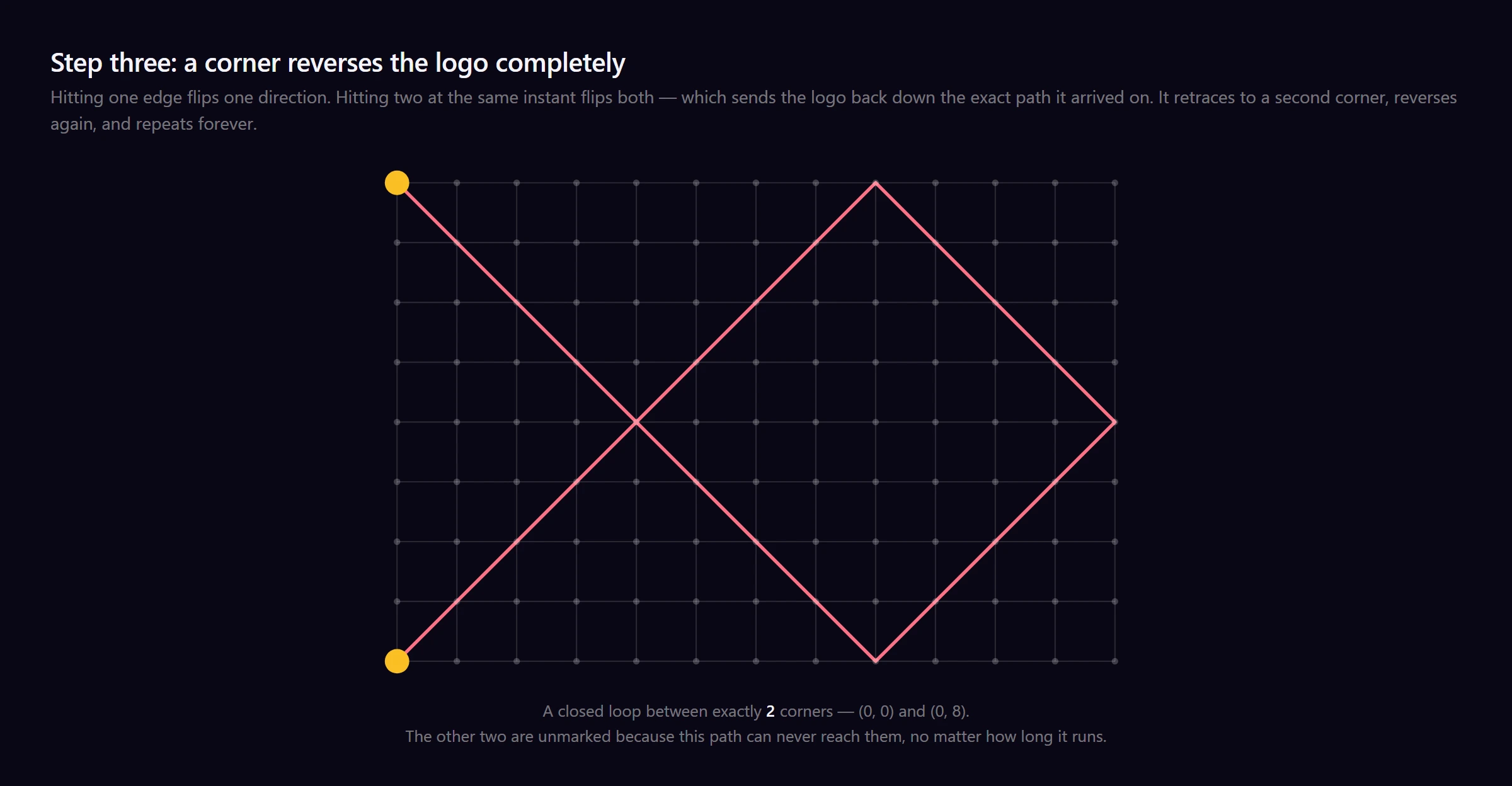
So a bouncing logo is not a restless line that will eventually wander over everything if you give it long enough. It is a closed out-and-back circuit with a turning point at each end, and those turning points are corners.
We come back to this at the end, because it settles the four-corner question outright.
How Long Between Hits
The two alarms from step two do not only tell you whether a corner happens. Push them a little further and they tell you how often.
Once they have rung together, when is the soonest they can do it again? Not before a whole number of X-cycles has elapsed, and not before a whole number of Y-cycles has too. The first moment that is a multiple of both X and Y is — by definition — their lowest common multiple. There is nothing else to work out.
- For a start that works, a corner hit lands every LCM(X, Y) frames, exactly, without ever drifting
- And every path, corner-reaching or not, closes on itself every 2 × LCM(X, Y) frames: out to one turning point and back again, exactly as step three described
Take the 4K 60fps clip everyone shares. Its logo has 317 horizontal and 186 vertical resting positions, so X = 316 and Y = 185. Those two are coprime — a gcd of 1 — which by step two means every starting position on that screen works. And LCM(316, 185) is simply 316 × 185 = 58,460 frames: 16 minutes, 14 seconds and 20 frames.
That prediction is testable, and it holds. In that video the first corner hit lands at 13:29:38 and the second at 29:43:58 — minutes, seconds and frames. We checked: 48,578 frames and 107,038 frames, a gap of 58,460 exactly, to the frame.
Why Your Resolution Barely Matters
You will see “16 minutes 14 seconds” repeated as though it follows from 4K at 60fps. It does not. Look at what the answer is actually made of:
LCM(X, Y) = X × Y ÷ gcd(X, Y)
The wait, in frames, between one corner hit and the next.
Resolution moves X and Y, and it moves them gently — doubling the screen roughly doubles each. But the gcd sits in the denominator, and a gcd is not a size. It is an accident of which numbers happen to share factors, and it can leap from 1 to 127 between two setups that look identical.
Here is what that does. The same 284 × 128 logo at the same 4 pixels a frame, with nothing changed but the screen:
- 1080p
Grid 409 × 238. They share nothing, so LCM is the full 409 × 238: a corner hit every 27 minutes.
- 4K
Grid 889 × 508. They share a factor of 127, which divides straight out: every 59 seconds.
Four times the pixels, and the wait got 27 times shorter. That is the opposite of how this is usually told, and it has nothing to do with 4K being bigger — it is because 889 and 508 happen to share 127 while 409 and 238 happen to share nothing.
Logo size does the same thing, just as violently. Hold the screen at 3840 × 2160 and the speed at 4 pixels a frame, keep the logo’s real proportions, and change only how big it is:
- 176 px logo
Grid 916 × 520. Corner hit every 33 minutes 5 seconds — from one start in 4.
- 204 px logo
Grid 909 × 517. Every 2.18 hours, but from any start at all.
- 256 px logo
Grid 896 × 511. Down to 18 minutes 10 seconds, from one start in 7.
- 284 px logo
Grid 889 × 508, which share a factor of 127. Every 59 seconds.
- 292 px logo
Grid 887 × 507, coprime. Back up to 2.08 hours.
- 300 px logo
Grid 885 × 506. Every 2.07 hours. No trend — it jumps.
Same screen, same frame rate, same speed. Eight pixels of logo width is the difference between a one-minute wait and a two-hour one — a 127-fold jump, because 889 and 508 share a factor of 127 while 887 and 507 share nothing at all. And notice the sequence does not trend. It has no reason to: it is tracking divisors, not dimensions.
So the answer is not governed by how big anything is. Nudge any setting and the arithmetic reorganises from scratch.
So How Long Until It Hits All Four Corners?
Which brings us to the question people actually want answered. If one corner takes sixteen minutes, four ought to take about an hour. Right?
No. You will never see it — not in an hour, not in a year, not if you left it running until the heat death of the universe.
Step three already handed us the reason. A corner does not deflect the logo, it reverses it, so the logo retraces its own path to a second corner, reverses again, and comes back. That is a closed circuit with exactly two turning points on it. The other two corners are not far off or unlikely. They are simply not on the route, and nothing in the system could ever put them there.
Nor is which two you get down to luck. Like everything else here, it was fixed by the starting square.
We checked this rather than assuming it. Simulating 281,250 starting configurations — every grid up to 26×26, both diagonal directions, every starting square — the outcome was 2 corners or 0 corners every single time. Not one run produced 1, 3 or 4. Of those, 205,342 reached two corners and 75,908 reached none.
So the honest answer to “how long until all four corners?” is not a number at all. There is no wait, because there is no event to wait for — and that was settled before the logo finished its first bounce.
Try It Yourself
Our simulator is the fastest way to get a feel for the bouncing, with one honest caveat: it launches each logo at a random angle between 25° and 65°, not at a fixed 45°. That was a deliberate choice — it looks better and the paths stay interesting — but it does mean corner hits there follow their own logic rather than the tidy lattice arithmetic above. The clean arithmetic belongs to the true-diagonal case: the original DVD players, and the clip we measured.
What you can do is change every variable this article turns on and watch what it does to the bouncing. Adjust the speed and the scale, raise the object count to send several logos along different paths at once, and cycle the aspect ratio between 16:9, 9:16 and 1:1 — each one a differently shaped problem.
Then export it as a GIF, as MP4 or WebM at up to 1080p, or as a standalone HTML file that loops forever with no internet connection — if you want to leave one running and see a corner hit for yourself.
No watermark, no account, no cost. Your image is processed by your own browser and never uploaded anywhere.
Frequently Asked Questions
Does the DVD logo ever actually hit the corner?
Sometimes — and whether it does is fixed the moment it starts moving. For any given screen, logo and speed, a starting position either reaches a corner or it never will. There is no third outcome and no element of luck. The test is arithmetic: take the greatest common divisor of the grid width and height. A logo heading down-and-right reaches a corner only if that divisor divides the difference of its starting coordinates; heading up-and-right, only if it divides their sum. Roughly one starting square in every gcd qualifies.
How long does it take the DVD logo to hit the corner?
Reduce the screen to the grid of positions the logo can actually occupy. If that grid is X wide and Y tall, a corner hit happens every lowest common multiple of X and Y frames. On the widely-shared 4K 60fps clip that is 58,460 frames — 16 minutes 14 seconds between hits. That figure is specific to that clip, not to 4K in general.
Does screen resolution decide how long the corner hit takes?
No. We ran the same logo at the same speed on both: the 1080p screen gave a corner hit every 27 minutes and the 4K screen every 59 seconds. Four times the pixels, a 27× shorter wait. What decides the timing is whether the grid's width and height share factors, not how many pixels there are — so any answer quoted purely as "4K at 60fps" is describing one particular video rather than a property of 4K.
Can the DVD logo hit all four corners?
No, and not merely because it is unlikely — it is impossible. Once the logo reaches a corner it reverses along the exact path it arrived on, retraces that path to a second corner, reverses again, and repeats forever. The route is a closed loop between two corners, so the remaining two can never be reached from that start. Waiting longer does not help.
How many corners can the DVD logo hit?
Exactly two, or none at all. We simulated 281,250 starting configurations across every grid up to 26×26 in both diagonal directions, and no run ever produced one corner, three corners or four.
Is the corner hit random?
Not at all — it is completely deterministic. Given the screen, the logo, the speed and the starting position you can calculate in advance whether a corner will ever be hit, how long the wait is, and which two corners it will be. The unpredictability is an illusion created by the bouncing.


